Short answer: An e-Ledger berat is the signed summary that says the journal and the general ledger for that period were sent to the Revenue Administration. The berat does not replace a VAT or provisional-tax return. On a monthly upload, the July 2026 berat is due by 10 November 2026 for an income-tax taxpayer and by 16 November 2026 for other taxpayers. Other months are read from that month’s Revenue Administration calendar.
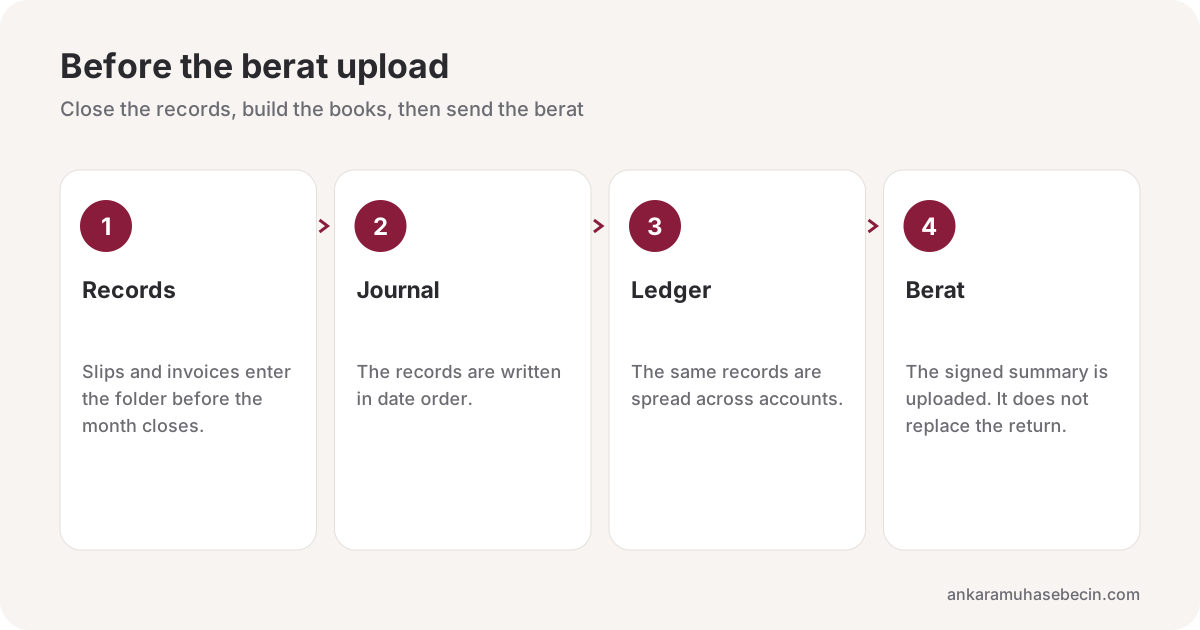
In a file that is closed in a hurry, the berat is dropped into the same envelope as the return and then forgotten. They are separate jobs. The invoice and the archive document enter the records. The ledger is built from those records. The berat says the ledger was transmitted. The return states the tax separately. The same split is in the monthly tax calendar.
Which ledger does the berat send?
The two books kept under the e-Ledger application are the journal and the general ledger. The journal is the records in date order. The general ledger is the same records spread across accounts. The berat is the file that says those books were created for the period and transmitted unchanged. Uploading the berat takes the place of printing the books. A berat that is not uploaded means that period’s books were not transmitted.
The ledger is fed by electronic invoices and other documents. Whether a document is an e-Invoice or an e-Archive invoice does not change the berat day. That split is in e-Invoice vs e-Archive. Whether a shipment of goods also needs an e-dispatch note is a separate question. That guide is the e-dispatch note.
| Item | What it does | What it does not replace |
|---|---|---|
| Journal | Keeps records in date order | A tax return |
| General ledger | Spreads the same records across accounts | A tax return |
| Berat | Shows the books for that period were sent | VAT, withholding, provisional tax |
| Return | Reports the tax calculation | The ledger berat |
When is the July 2026 berat due?
The upload choice splits in two. A monthly upload and an upload by provisional-tax period do not fall on the same day. The berat day cannot be reduced to one number. The calendar the Revenue Administration publishes for that month is the source. An extension, if any, is in a circular.
On the monthly upload, the July berat that sits on the 2026 calendar is due on these days. For an income-tax taxpayer the last day is 10 November 2026. For other taxpayers the last day is 16 November 2026. Those two days are separate from the third provisional-tax deadline on 17 November. Filing the provisional return does not upload the July berat. The period itself is in the Q3 provisional tax article.
August, September and the months after them are not invented in this article. Each month’s berat day is read from that month’s calendar. The close of the month also carries VAT on the 28th and withholding on the 26th. The three are not the same day.

What breaks at month end?
The records close before the berat. A missing slip that waits until after the upload, on the idea that it can be fixed later, splits the books from the return. A correction is then a separate job in both. The order of the monthly folder is in the monthly accounting document checklist.
In an e-commerce file, profit looks inflated if a marketplace commission or a return never entered the period. The berat does not correct that profit by itself. Matching the payout to the documents is in marketplace payout reconciliation. The same split appears in a courier or freelance file when an expense slip arrives after the month has closed.
The transition itself finishes before the first berat day. A financial seal or an electronic signature, the choice of an integrator or the portal, and the creation of the books are that preparation. The obligation threshold depends on turnover, the activity and the rules of the period. A threshold is not memorised. The current scope is checked, before the switch, with the advisor and the Revenue Administration notice. A business outside the scope can still join voluntarily. The setup side of the work is on the e-Transformation page. The monthly watch sits on the same calendar as bookkeeping.
Can an uploaded berat be changed later?
The berat is a summary of the books as they stand. Adding a slip after the upload does not update the old berat by itself. A correction means creating the books again and a new berat. The return is corrected separately. “The berat is up, the slip can wait until tomorrow” does not close the month. The slip goes into the folder before the upload.
The signature or the financial seal has to match the books of the period the berat belongs to. A mismatched signature does not count as an upload. A “sent” mark on the integrator’s screen is not the same thing as the Revenue Administration’s acceptance. Acceptance shows that the berat for that period was received. A screenshot does not replace acceptance. The acceptance record does not replace the receipt of the tax return either. The two are downloaded separately and kept in the same folder.
A file that uploads by provisional-tax period does not use the monthly days of 10 and 16 November. That file’s day is on the period calendar of the Revenue Administration. A file that uploads monthly uses, for July, whichever of those two days matches the type of taxpayer. The choice is not treated as having changed quietly during the year. If it did change, the new choice sets the day of the next berat and is written on the file.
Mistakes that repeat
- Treating the berat as a substitute for the VAT return.
- Reading the July berat as the 17 November provisional-tax day.
- Treating the monthly upload and the period upload as the same day.
- Uploading a berat with a missing slip and leaving the correction to next month.
- Memorising an obligation threshold from an old article.
- Losing access to the old berat archive when the integrator changes.
Retention continues electronically on the same idea as a paper book. The berat file is kept so it can be produced intact when it is asked for. If a private integrator is used, the retention clause is read in the contract. If the portal is used, the backup is the business’s own routine. When the provider changes, keeping the old periods downloadable is as much of the job as the next berat.
In an Ankara file the berat day is written as its own line beside the return day. A workplace in Çankaya, Yenimahalle, Keçiören or Etimesgut still follows the same Revenue Administration calendar. The district does not change the berat day. The upload choice and the type of taxpayer do.
Frequently asked questions
Does the berat replace the return?
No. The berat shows that the journal and the general ledger for that period were sent. VAT, withholding and provisional tax are filed separately.
When is the July 2026 berat uploaded?
On a monthly upload, 10 November 2026 for an income-tax taxpayer and 16 November 2026 for other taxpayers. A period upload falls on a different day, read from that month’s calendar.
Is the berat day the same every month?
No. It depends on the upload choice and on the Revenue Administration calendar for that month. An extension is in a circular.
Does issuing an e-Invoice create an e-Ledger duty?
Not by itself. The e-Ledger scope is announced separately. Thresholds change and are checked before the switch.
Can a berat be uploaded with a missing slip?
The uploaded berat transmits the books as they stand. A missing slip later forces a correction of both the books and the return. The slip goes into the folder before the close.
Is the berat file kept?
Yes. It is kept electronically, intact, and ready to be produced. Access to old periods should stay open if the integrator changes.
Conclusion
The e-Ledger berat shows that the journal and the general ledger were sent. It does not replace VAT, withholding or provisional tax. On a monthly upload the July 2026 berat is 10 November for an income-tax taxpayer and 16 November for the others. Other months are read from that month’s Revenue Administration calendar.
Ankara Muhasebeci writes the berat as its own line beside the return day, from the Kızılay office. To talk through your own period, see e-Transformation or write to us.